
Everything your shop runs on, in one place
The till, the stock book, the debt book, the supplier file and the cash book — joined up, so a sale updates the stock, the customer's balance and your profit at the same moment.
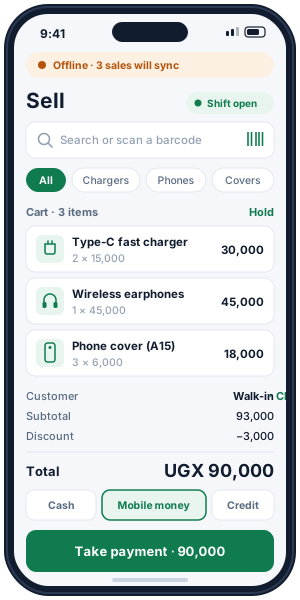
A till that keeps up with a busy counter
Find the item, take the money, hand over the receipt. The stock, the customer's account and the day's takings move with every sale.
- Search or scan by name, code or barcode.
- Cash, mobile money, card, bank or credit — or split one sale across several, with the change worked out.
- Pack sizes: sell a single, a dozen or a carton, each with its own price and the stock counted in pieces.
- Receipts printed, saved as PDF or sent on WhatsApp.
- Returns and voids with a reason: good items go back on the shelf, faulty ones are written off.
- Shifts and cash-up: open a shift, count the drawer at the end, see any difference.
Know exactly what is on the shelf — and why
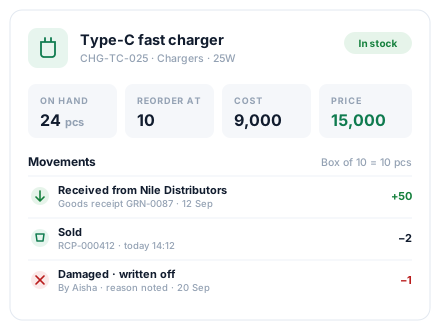
Stock is never just a number someone typed. Every item in and out is its own entry with a reason and a name, so the quantity always adds up and you can see where the missing ones went.
- Every movement recorded: sales, deliveries, damage, loss, returns, counts and transfers.
- Low-stock levels per product and a reorder list with suggested quantities.
- Stock counts: count the shelf, and the differences are posted for you.
- Batches and expiry dates for pharmacies and agro-vets, with an expiring-stock report.
- Stock value at cost and at selling price, for the people allowed to see cost.
A debt book that never forgets
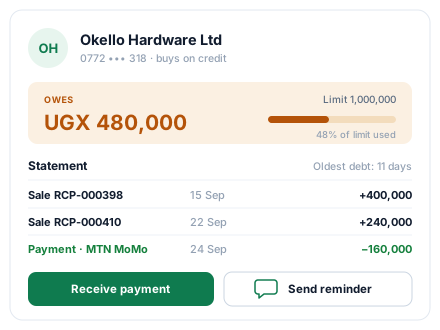
Credit sales land in the customer's account by themselves. You see what each customer owes, since when, and every sale and payment behind the figure.
- Credit limits and payment terms per customer.
- Receive payments — in full or in parts, by any method — against any sale.
- Statements of every sale, payment and return.
- Friendly reminders by WhatsApp or SMS — automatically, at most once a week, for overdue balances, or sent by hand.
- Who owes what, by age: chase the oldest debts first.
From the order to the shelf to the payment
Buying is recorded the same careful way as selling, so your stock, your costs and what you owe each supplier are always right.
- Supplier file with contacts, balances and history.
- Buying prices update from what you actually paid, so profit stays true.
- Reports of purchases and of what you owe each supplier.
1. Purchase order
Send the supplier a numbered order for what you need.
2. Receive the goods
Count what arrived against the order; the stock and buying prices update.
3. Pay the supplier
Record full or part payments; the supplier balance follows.
4. Return faulty goods
Send back what is damaged or wrong; stock and balance are corrected.
See your real profit, not just your sales
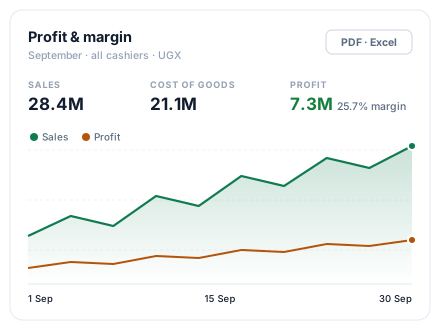
Profit is worked out from what each item cost you, then your expenses come off. Every figure matches between the phone, the computer and the daily summary.
- Income and expenses in your own categories — rent, transport, salaries, airtime.
- Financial periods so each year's books stay separate.
- 13 ready reports, filtered by dates, downloadable as PDF or Excel.
Give every person the right keys
Add your staff with their own logins. Each gets a role, and the role decides what they can do and see — on the phone and on the computer. Remove someone's access whenever you need to.
| Can… | Owner | Manager | Cashier | Stock keeper | Accountant | Viewer |
|---|---|---|---|---|---|---|
| Sell and take payments | Yes | Yes | Yes | No | No | No |
| Give discounts and change prices | Yes | Yes | No | No | No | No |
| Void a sale | Yes | Yes | No | No | No | No |
| Take returns and refund | Yes | Yes | Yes | No | No | No |
| Receive stock and manage suppliers | Yes | Yes | No | Yes | No | No |
| Adjust stock (damage, loss, corrections) | Yes | Yes | No | Yes | No | No |
| See cost prices | Yes | Yes | No | Yes | Yes | No |
| See profit | Yes | Yes | No | No | Yes | No |
| See reports and dashboards | Yes | Yes | No | No | Yes | Yes |
| Invite and manage team members | Yes | No | No | No | No | No |
Owners can do everything, including billing, team and settings. Every sale, void, payment and stock change records who made it.
Your whole shop in your pocket — even with no network
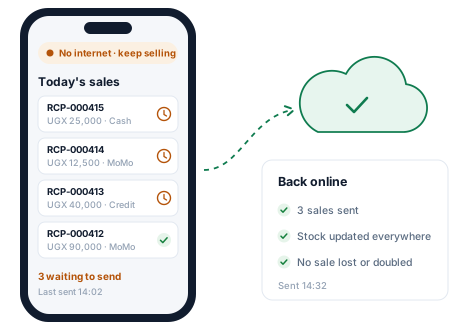
The Budget Pro app for Android runs the counter, the stock and the debt book from the phone. It works offline and catches up by itself when the connection is back.
- Sell, change stock and add customers offline. Everything is saved on the phone first.
- A finished sale is always accepted when it syncs — if stock went short meanwhile, it is flagged for you to check.
- Several phones, one shop: each phone sees the others' sales once they sync.
- An optional PIN locks the app on a shared phone.
- Signing out clears the shop's data from the phone, with a warning if anything is still unsent.
Your shop's records stay yours
The same care behind every screen, on every plan.
Try Budget Pro free for 14 days
Create your shop in a minute. No card, and nothing to install on the computer.